DCA Reminders: Organize Your Investing Routine with Open Fire
A practical reminder workflow for investors who want a recurring contribution plan to stay visible when markets become distracting.
Jenius Tech SRL
DCA reminders help you remember a recurring investment routine; they do not make the investment for you. Open Fire lets you choose reminder days, keep a personal note and optionally receive scheduled reminders through Telegram.
The goal is organization. Use the reminder to revisit your plan and available funds, then carry out any investment separately through the appropriate account.
Understand what the reminder represents
Investor.gov defines dollar-cost averaging as investing equal portions at regular intervals regardless of market movements. A reminder can help keep that routine visible.
It does not make an investment suitable, remove the possibility of loss or guarantee a better result than another approach. Contribution amounts and investment choices depend on your circumstances; the app is not selecting them for you.
Choose days that fit your routine
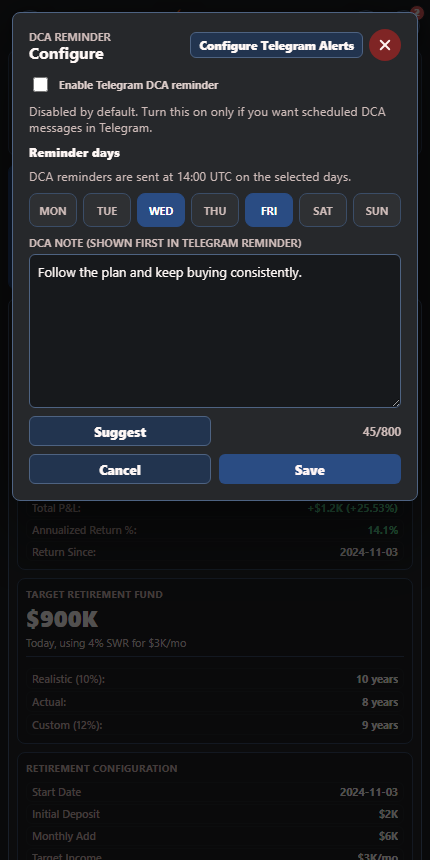
Investors can align reminder days and a personal note with their own contribution routine.
Open DCA Configuration in Open Fire and select your reminder days. Match them to a routine you can sustain, such as checking available funds after your regular income arrives.
The dialog shows the scheduled delivery time. Confirm the current label in your own app instead of assuming a time from a screenshot applies to every setup. A reminder day is a prompt, not an order to invest on a particular market date.
Write a note with a useful next step
The DCA note appears first in the Telegram reminder. Use it for a short, clear instruction to yourself: check the planned amount, verify available funds and review the intended destination.
Avoid writing a note that treats market movement as an automatic decision. A useful example is “Review the monthly plan and account balance before contributing.” It keeps the routine deliberate without promising a financial outcome.
Open Fire offers suggested notes as a starting point. Read and adapt a suggestion rather than assuming it suits your situation.
Enable Telegram only when you want delivery
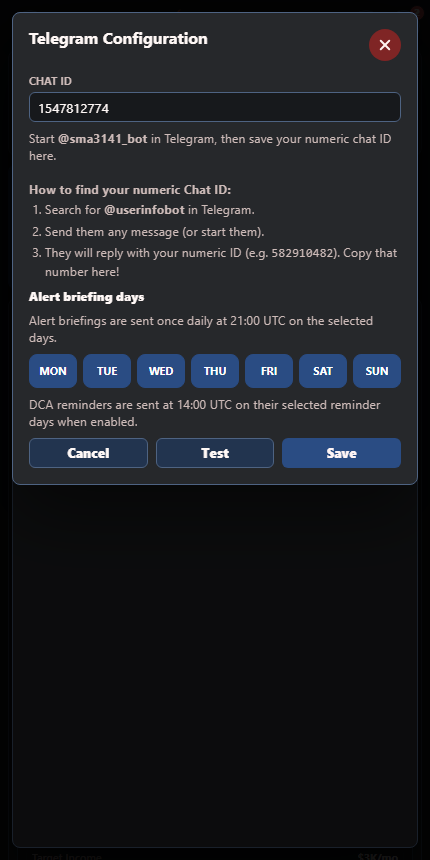
Telegram configuration keeps the delivery destination and briefing schedule visible.
The DCA dialog has a separate Enable Telegram DCA Reminder control, disabled by default. Configure your Telegram destination, verify it using the test action and then choose whether to enable this reminder type.
The selected DCA days are separate from alert briefing days. Set each around the information you want to receive rather than assuming one schedule covers both.
Review the routine when circumstances change
A recurring plan should remain realistic. Revisit reminders after an income change, a major expense or a change in your goals. If a reminder repeatedly gets ignored, adjust the routine rather than letting messages accumulate.
Keep transaction records in the relevant investment account and update portfolio tracking as needed. The reminder is an organizational aid; it is not a transaction history or broker execution service.
Does Open Fire automatically buy investments?
No. DCA reminders and recorded portfolio information are separate from executing trades.
Can I choose several reminder days?
The configuration offers weekday selection. Choose the schedule you actually want to follow.
Do I need Telegram for every part of Open Fire?
No. Telegram is an optional delivery channel for reminders and briefings; the dashboard remains the place to review the information.