Stock Alerts and Telegram Notifications with Open Fire
A focused way to review triggered position alerts and receive scheduled updates in a familiar messaging channel.
Jenius Tech SRL
A stock alerts app helps when it tells you what deserves inspection and gives you a dependable way to find that information. Open Fire combines an active-alert view with Telegram configuration for scheduled briefings and optional DCA reminders.
Start with the alerts inside the dashboard, then configure delivery. A notification is a prompt to review a condition, not a recommendation to buy or sell.
Inspect the active alert first
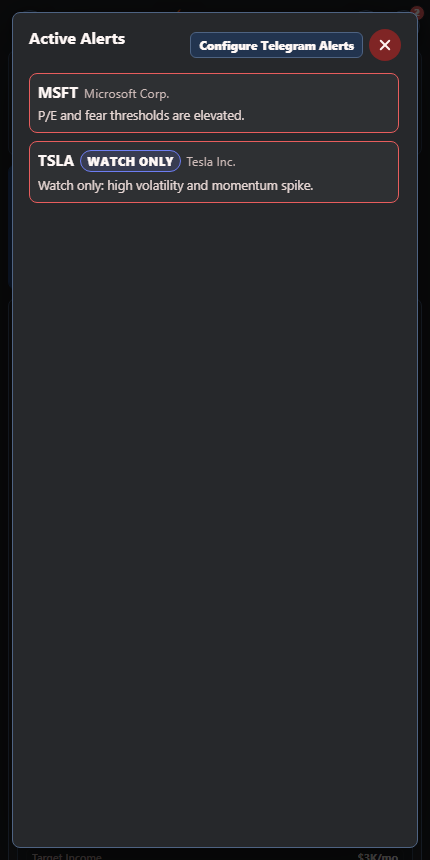
Investors can review the conditions that triggered an alert before deciding whether it matters.
Open Fire’s active-alert view collects triggered position conditions. Review the symbol and the measure or threshold behind the message, then return to the holding and its available data.
Check whether the information is current and relevant to your time horizon. A warning about a changing market measure may matter differently to a long-term investor than to someone watching short-term movement.
Do not interpret silence as proof that no risk exists. Coverage, enabled conditions, provider availability and scheduling all affect what can appear.
Configure your own Telegram destination
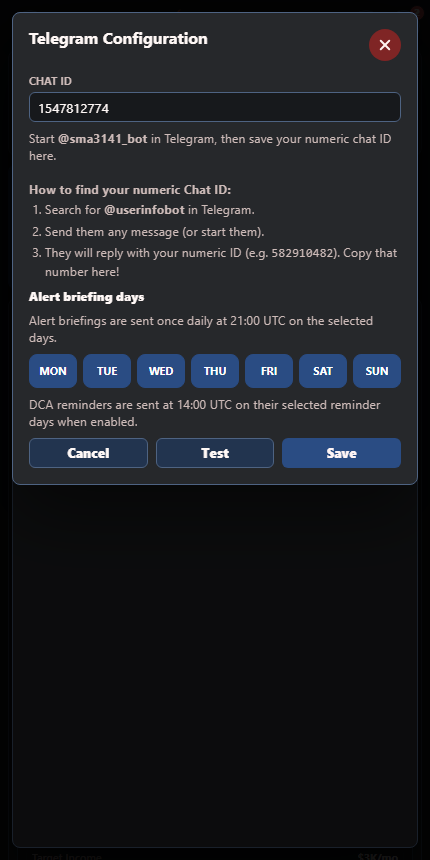
Open Telegram Configuration in Open Fire. The dialog shows the app’s bot and the chat identifier required for your destination. Follow the current in-app setup instructions, save your own chat setting and use Test to verify delivery.
Treat chat identifiers and configuration details as account information. You do not need to post them publicly or include them in an article screenshot. Use the setup for a destination you control and expect to receive messages in.
Choose briefing days deliberately
The real configuration screen makes scheduled briefing days visible beside delivery settings.
The Telegram dialog lets you select alert briefing days and shows the scheduled delivery time. This is a scheduled briefing workflow, so do not assume every threshold crossing creates an immediate real-time Telegram message.
Choose days that fit your review routine. Test the destination first and check the schedule displayed in your own app rather than relying on a time copied from an older guide.
DCA reminders have their own selected days and enable control. Configuring Telegram alone does not mean you have chosen to receive every type of message.
Reduce messages that do not help
Begin with the conditions and schedule you actually plan to review. For each message, ask: does it identify a position or measure, explain why it appeared and point to information I can verify?
Read the underlying holding before acting.
Check whether the data date fits your purpose.
Keep a short note of what needs further research.
Revisit settings if repeated messages no longer add useful information.
A more selective routine can be easier to sustain than a feed you stop reading.
Check delivery as part of setup
Use the app’s test action and confirm receipt in Telegram. If nothing arrives, check the destination, bot conversation, saved settings and available app status. Do not assume an unsent message means the market condition never occurred.
Are Telegram stock alerts guaranteed to arrive instantly?
No. Open Fire’s configuration describes scheduled briefings. Delivery also depends on service availability and a working destination.
Do alerts execute trades?
No. They help you notice and review information; transactions remain separate.
Can I receive DCA reminders too?
Yes, through the separate DCA enable control and reminder-day settings.