Give restaurant owners one place to compare restaurant reports while keeping each restaurant’s figures and currencies clear.
Jenius Tech SRL
Open Order brings the accounting reports for restaurants you manage into one portfolio view. Owners and managers can compare restaurant revenue and payment totals for a selected period. Reports keep different currencies in separate summaries.
The example uses fictional Demo Bistro restaurants in Brussels, Antwerp and London. It demonstrates the workflow, rather than the performance of a real restaurant group.
Compare restaurants in one accounting view
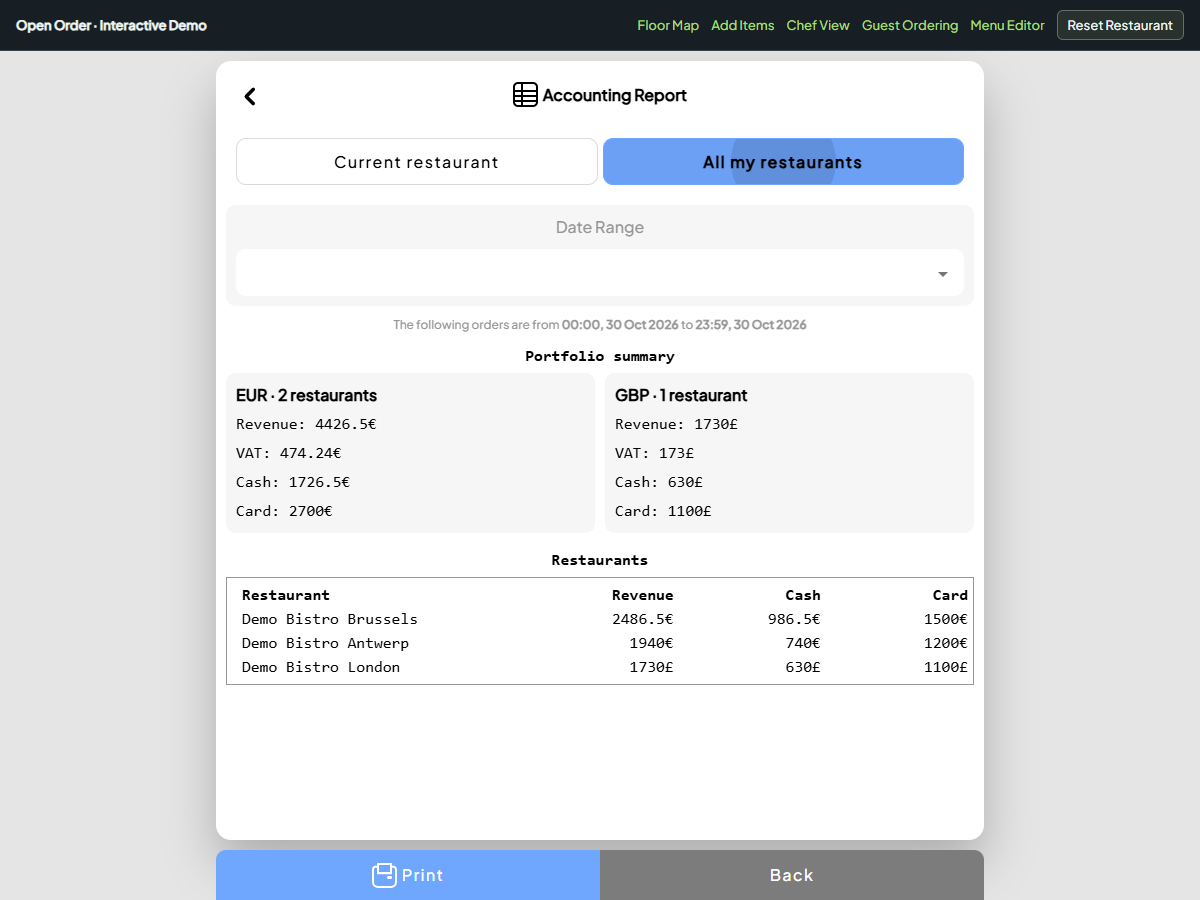
Compare fictional restaurants in the real accounting interface. Euro and pound summaries stay separate.
Switch between the current restaurant and a group report. Review cash and card totals, with currencies kept separate. These are fictional restaurant figures.
Open Accounting Report and choose All my restaurants. The screen shows currency summaries followed by a restaurant table. Each row identifies the restaurant and its revenue, cash and card amounts.
This helps an owner start the morning review with the same question for each restaurant: what happened during the selected period? A manager can compare the figures without repeatedly switching the active restaurant.
The portfolio includes restaurants where the signed-in account has manager or owner membership. Giving someone access to one restaurant does not automatically give them access to every restaurant in the group.
Keep comparisons meaningful
Select the same reporting period before discussing results with the team. Revenue alone does not explain why one restaurant differs from another. Opening hours, seating capacity, takeaway demand and the service mix can all affect the result.
The portfolio keeps euro and pound totals separate. A restaurant group should apply its own agreed exchange-rate process before preparing consolidated financial statements. Adding numbers from different currencies would create a misleading total.
Use the restaurant table to identify a question, then review the corresponding restaurant’s report and Order History. A summary is a starting point for investigation, not evidence of a particular cause.
Keep local service close to the figures
The shared view complements the existing restaurant workspace. Staff still use their restaurant’s floor map, menu, Chef View and checkout flow during service.
For a group operator, that means the reporting conversation can stay connected to recognizable work: tables served, dishes prepared, payments recorded and completed orders. Each restaurant can be discussed in its own context rather than reduced to a ranking.
A practical review can follow these steps:
Confirm the reporting period.
Review each currency summary separately.
Find a restaurant that needs a closer look.
Check its payment breakdown and underlying orders.
Agree the next action with the responsible manager.
Can a waiter see every restaurant’s revenue?
The portfolio uses manager and owner memberships. Staff access to another restaurant’s operational screens does not itself grant portfolio reporting access.
Does this replace group accounting?
It provides an operational view of restaurant reports. It does not replace bookkeeping, currency conversion, statutory reporting or an accountant’s review.
Can I try the workflow before signing in?
Use the interactive accounting example above. Its restaurant names and financial amounts are fictional, and demo interactions do not change a live restaurant.